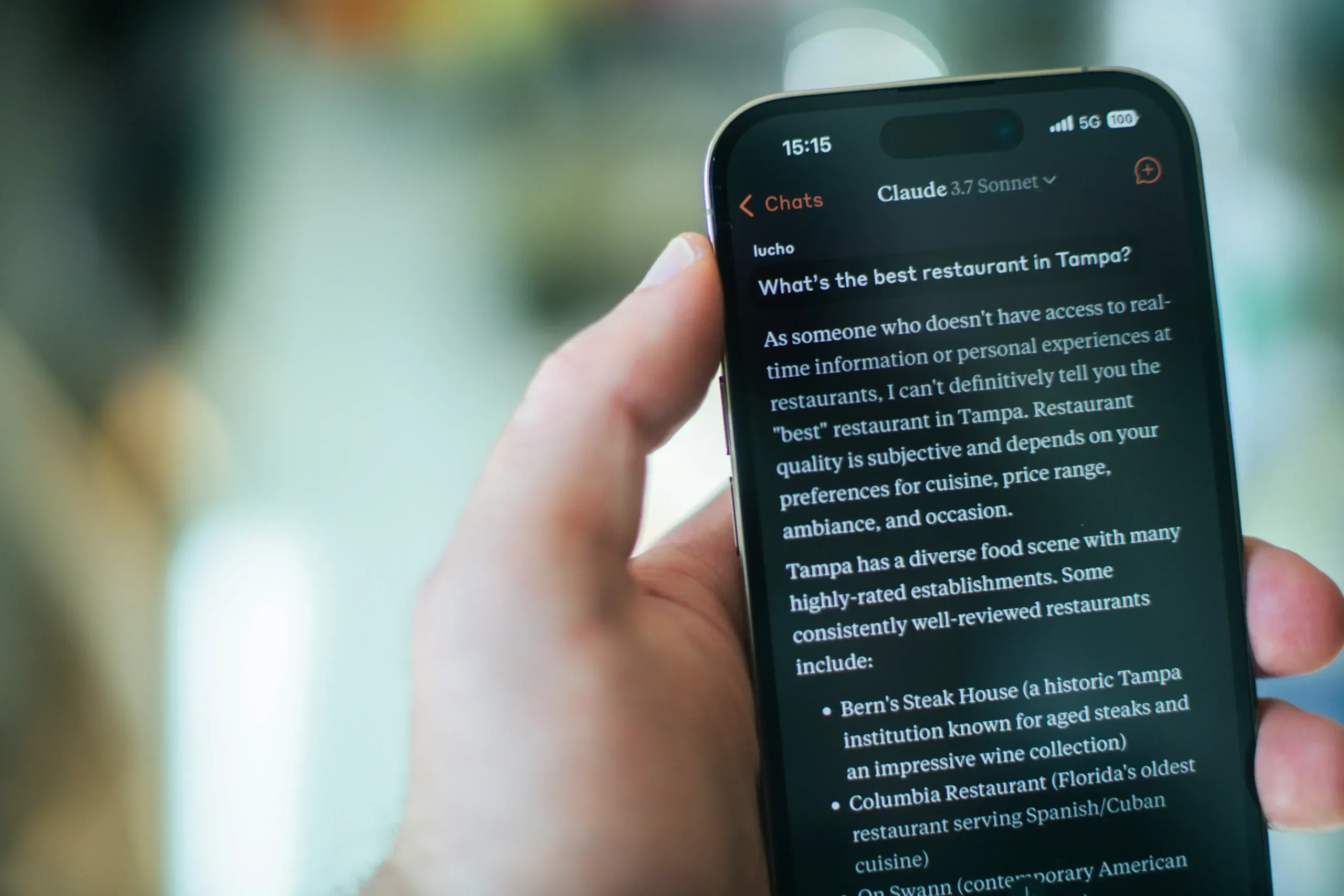

Traditional content audits tell you which pages are losing rankings, traffic, and conversions, but they do not tell you whether AI systems can retrieve your pages and choose them as sources.
A GEO content audit adds that missing layer. It shows which pages perform well, which have retrieval problems, and which are available but rarely cited, so you can prioritize the right fixes.
And if done correctly, audits and fixes can lift your AI citations by 221%.
Download the GEO content audit checklist
Key Takeaways
- A GEO content audit shows whether AI systems can retrieve and cite your pages. Traditional audits show which pages are losing rankings, traffic and conversions, but not this.
- It runs in four phases. Gather the data, prioritize the right pages, audit high-priority pages, then implement the fixes and keep monitoring as a loop.
- Prioritize, because you can’t audit everything. Score each page on business value, search demand, organic visibility and AI visibility, then label it High, Medium, Low or Reference.
- Fix access before copy. Check indexing, AI crawler access and clean HTML first, since 69% of AI crawlers can’t execute JavaScript (searchVIU), then lead with the key claim, as 44.2% of LLM citations come from the first 30% of a page (Kevin Indig).
- Audits can pay off. A Position Digital case study reports a 221% rise in AI citations (from 14 to 45) over six months after a technical SEO audit and fixes.
What is a GEO Content Audit?
A GEO content audit is a page-by-page analysis of how well your existing content can be retrieved and cited by generative AI search systems.
The goal is to identify patterns behind your strongest pages, diagnose weak pages, and turn those findings into a prioritized action plan.
Our GEO Content Audit Process
We split the process into four phases: gather the data, prioritize the right pages, audit high-priority pages, and then implement the fixes.
| Phase | What to do | Output |
| 1. Data gathering | Build the URL, keyword, prompt, ranking, mention and citation dataset | Evidence of where you win and lose visibility |
| 2. Prioritization | Prioritizing pages based on business potential and current performance | High, Medium, Low or Reference worklist |
| 3. Content audit | Audit priority pages for access, structure, evidence, originality and freshness | Page-specific fix list |
| 4. Implementation and monitoring | Execute the fixes and continuously improve | Ongoing GEO performance loop |
Phase 1: Data Gathering
Before you conduct an audit, first you need to gather the data.
Step 1: Compile your entire content catalog
Crawl your entire website with Screaming Frog, Sitebulb or an equivalent crawler.
Export every important content URL and paste the list into a spreadsheet. It becomes the working document for the audit.
Here’s a template you can use: GEO content audit sheet.
Step 2: Map keywords to each page
For every page in your catalog:
- Pull non-branded keywords it already ranks for. Use data from Google Search Console and rank tracker tools like Ahrefs or Semrush.
- Add relevant keywords it could reasonably target. Use keyword research tools to find related terms with high search volume and reasonable difficulty you can target. Also, do competitor analysis to find more keyword opportunities.
- Clean the list. Remove accidental rankings, non-target languages, and queries outside your product’s real territory.
Map these keywords to each URL in your spreadsheet. Populate the data with important keyword information like search volume and keyword difficulty.
Here’s an example from our client:
| Page | Keywords | Volume | KD |
| /features/capacity-planning-software | capacity planning tools | 700 | 7 |
| agency capacity planning software | 10 | 1 | |
| /blog/project-management/project-life-cycle | project life cycle | 1,800 | 13 |
| project management phases | 1,100 | 13 |
Step 3: Run each keyword on Google
For each keyword, record:
- Organic SERP position. Record the mapped page’s actual organic position.
- AI Overview presence. Does the query trigger an AI Overview?
- Brand mentioned. If an AI Overview appears, does the answer name your brand or product?
- Page cited. Does the AI Overview use your mapped page as a source?
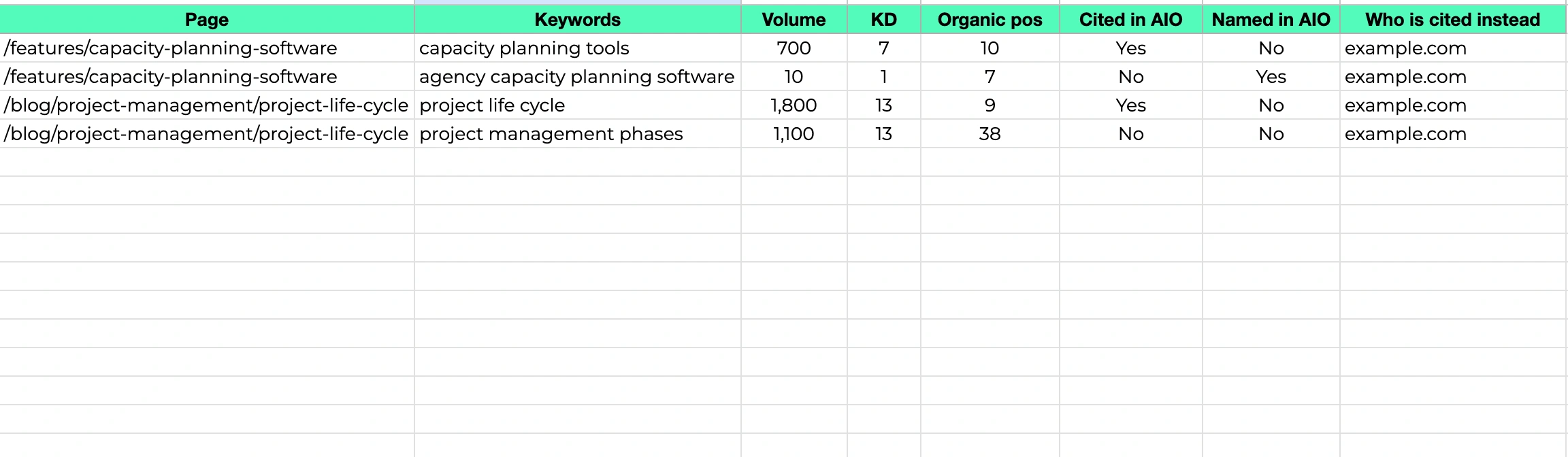
- Citation competitors. If your content is not cited, which domains and URLs are used instead?
Your spreadsheet should now look like this:
| Keywords | Volume | KD | Organic pos | Cited in AIO | Named in AIO |
| capacity planning tools | 700 | 7 | 10 | Yes | No |
| agency capacity planning software | 10 | 1 | 7 | No | Yes |
| project life cycle | 1,800 | 13 | 9 | Yes | No |
| project management phases | 1,100 | 13 | 38 | No | No |
Step 4: Turn keywords into prompts
Google AI Overviews run on keyword-triggered SERPs, but LLMs like ChatGPT, Claude, and Gemini are queried with conversational prompts.
Convert your priority keywords into the prompt phrasing a real user would type. You can ask an AI assistant like Claude or ChatGPT to do it for you.
For example:
| Keywords | Prompts |
| capacity planning tools | What are the best capacity planning tools? |
| agency capacity planning software | Recommend the best capacity planning tool for a small agency |
| project life cycle | What is a project life cycle? |
| project management phases | What are the core phases of project management? |
Group your prompts by topic and create a new tab for your prompt data. This will allow you to track your AI Overview and LLM visibility separately.
Here’s a template you can use: GEO content audit sheet.
Step 5: Get AI visibility data
Next, check how your content performs for each prompt on ChatGPT, Gemini, Claude, and any other LLMs that you track.
There are two options:
- Run your prompts manually. Use incognito mode, make sure you’re logged out, and run your prompts on each AI model.
- Use AI tracking tools like OpenLens. This is a lot easier, but you need to spend some money.
With OpenLens, you simply need to add your prompts and let the tool run them across seven major AI platforms (depending on your plan):
- ChatGPT (OpenAI)
- Claude (Anthropic)
- Google AI (Google AI Overviews / Search)
- Gemini (Google Gemini)
- Perplexity
- Grok (xAI)
- DeepSeek
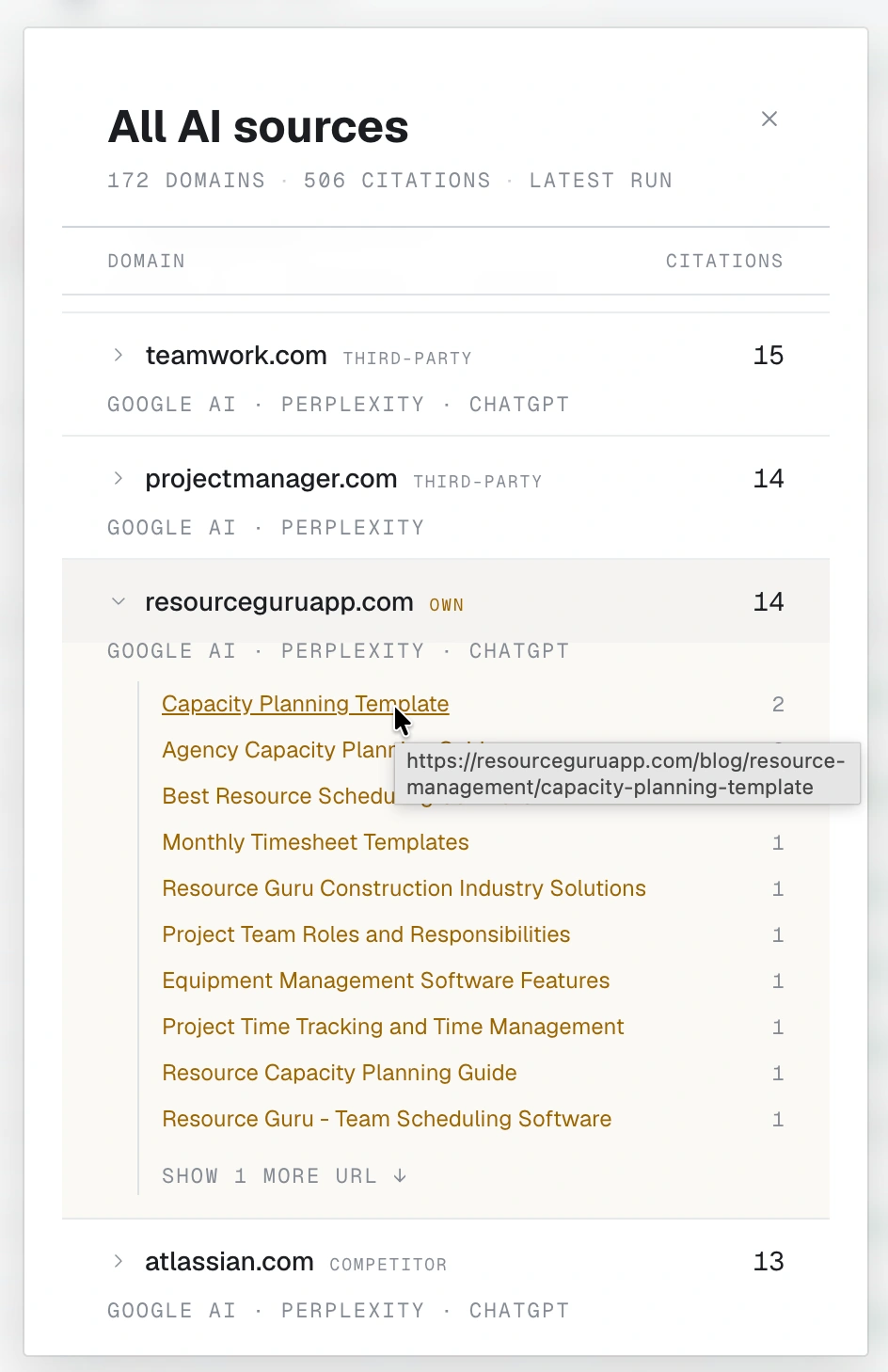
You can then see which pages are cited on each AI platform.
Whether you do it manually or with a tool, record the responses:
- Brands mentioned. Does the AI system’s answer text mention your brand or product? If not, who is mentioned?
- Citations. Does your page appear in the source list?
- Citation gap. If you’re not cited, who is, and what’s the citation rate on that page overall?
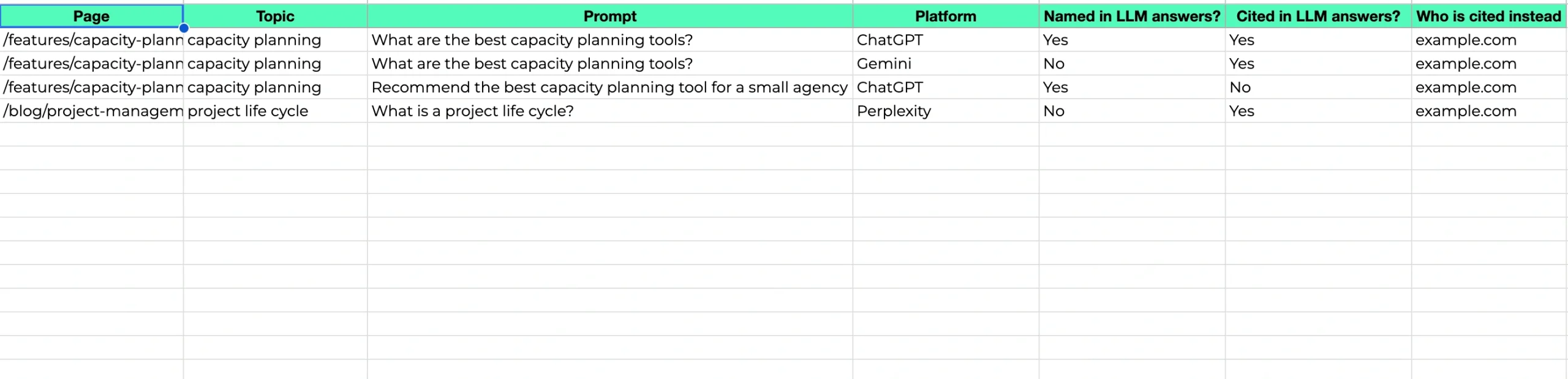
Your new AI visibility tab should look like this:
| Topics | Prompts | Platform | Mentioned in LLM answers | Cited in LLM answers |
| capacity planning | What are the best capacity planning tools? | ChatGPT | Yes | Yes |
| What are the best capacity planning tools? | Perplexity | Yes | No | |
| What are the best capacity planning tools? | Gemini | No | Yes |
Phase 2: Prioritization
Unless you’re a large SaaS organization, you won’t have enough time and resources to audit every page on your site.
That’s why it’s crucial to prioritize the most important pages first.
For each page, look at:
- Business value. Is it a homepage, product, feature, use-case or other commercially important page?
- Search demand. How many people are searching for this topic every month?
- Organic visibility. Does the page already rank for the keywords it targets?
- AI visibility. Is the content cited across AI Overviews and LLM responses?
After that, assign a priority for each page:
| Priority | What it means |
| High | Important page with meaningful demand and a clear citation opportunity, especially where the brand is already named but not cited |
| Medium | Real commercial or traffic potential, but the page has a weaker starting position or less consistent AI visibility |
| Low | Little business value, low demand or no realistic current visibility opportunity |
| Reference | Already performs strongly across its important query/prompt set; use it as the template for audited pages instead of rewriting it |
Phase 3: Content Audit
Start by auditing your high-priority pages, before moving on to medium-priority pages.
The purpose of this audit is to make sure that AI systems can access, index, and retrieve information easily from your pages.
Technical setup
- Have you submitted the page for indexing in Google and Bing? LLMs frequently retrieve pages from both search engines during web fetching.
- Is Cloudflare blocking AI crawlers? If you use Cloudflare, check whether the AI bot blocking feature is enabled inside security settings.
- Does your robots.txt allow the major AI crawlers? Those include GPTBot, OAI-SearchBot, ClaudeBot, PerplexityBot, and Google-Extended.
- Is the content served in clean HTML? 69% of AI crawlers can’t execute JavaScript (searchVIU).
- Does the page load fast enough? Check Core Web Vitals in Google PageSpeed Insights and keep them within the recommended thresholds.
- Is pricing information available in HTML? If ChatGPT can’t access pricing information on your page — often because of JavaScript — it scrapes and quotes third-party sites instead, which frequently surfaces incorrect or outdated pricing (Suganthan Mohanadasan).
Content structure and quality
- Does the URL clearly represent the page’s content? This is the first thing ChatGPT reads before deciding whether to visit a page at all.
- Is the title a self-contained sentence? Don’t worry about length — ChatGPT always reads a page’s full title no matter how long it is (Resoneo).
- Is the core message stated in the first 200 characters after the H1? That’s the only body text ChatGPT sees in Instant mode. (Resoneo)
- Does the page lead with BLUF (Bottom Line Up Front)? State the key claim, finding, or recommendation immediately, before background and context — 44.2% of LLM citations come from the first 30% of a page (Kevin Indig). If it’s buried after three paragraphs of background, AI may never reach it.
- Does the page follow a logical H1 → H2 → H3 structure? AI crawlers use your headings to build a semantic map of the page; a broken hierarchy distorts that map and reduces citation accuracy.
- Are H2s phrased as questions? Headlines that directly answer the question get cited 41% of the time vs. 29% for those that don’t (Kevin Indig).
- Does every section open with a question answered directly in the first sentence? This Q&A structure mirrors how AI retrieves and surfaces information.
- Are paragraphs short and self-contained, one idea each? If you’re making two points, that’s two paragraphs.
- Are entity names spelled out explicitly? AI learns context and associations through named entities. Avoid vague sentences like “this tool does this” or “we are an X company” — say “Ahrefs is an SEO tool that does this and that.”
- Does the page include enough facts and stats? Content with 5–7 statistics earns a 20% higher citation likelihood (AirOps); the typical AI-Overview-cited article covers 62% more facts than the typical non-cited one (Surfer SEO).
- Does the page include expert insight? Expert quotes with credentials can increase AI Overviews visibility by 78%. Pages with expert quotes also average 4.1 citations on ChatGPT versus 2.4 for pages without them (Wellows).
- Does the page cover the topic comprehensively? Pages over 20,000 characters average 10.18 citations vs. 2.39 for pages under 500 characters (Kevin Indig).
- Is the content kept up to date? Most LLMs prefer citing fresh content (Seer Interactive).
Download the GEO content audit checklist
Phase 4: Implementation
Auditing and implementing are two separate phases — don’t collapse them.
Once a page has an audit with a clear fix list, work through it in priority order: crawler access and rendering fixes first, then passage-level content fixes.
Continuously Monitor and Refine
A GEO content audit isn’t a one-off exercise. After executing fixes, keep monitoring the same metrics you audited on:
- AI retrievability — re-check that previously inaccessible pages are now retrievable.
- AI visibility — track impressions in Google Search Console and citation frequency in Bing Webmaster Tools.
- Cross-platform citations — re-test your prompt list on ChatGPT, Claude, Gemini, and other LLMs.
- Page-level trends — compare your strongest and weakest pages over time to find patterns worth replicating.
Keep a record of what changed on each page and when.
If a page doesn’t improve, revisit the technical setup, structure, evidence, or content itself. Treat it as a loop: audit, prioritize, optimize, measure, adjust, repeat.
Partner With a Proven SaaS GEO Agency
If you prefer to leave the audit and optimization work to specialists, partner with a SaaS GEO audit agency like Position Digital.
We help SaaS companies identify where their content is underperforming in AI search, fix technical and content-level issues, and improve visibility across platforms such as Google AI Overviews, ChatGPT, Gemini, Claude, and other AI models.
From auditing your existing content catalog to prioritizing updates and tracking performance over time, we can build and manage the entire AI search optimization process for you.
Contact us today and let’s boost your AI search presence!