
Calculating AI search ROI is simple. Take the revenue your AI search work brings in, subtract what the work costs, divide by the cost, and multiply by 100.
The hard part is getting the numbers. Most of what AI search does for a brand happens in answers nobody clicks, and many of the visits it does send arrive in your analytics with no source.
In this guide, I’ll show you how to forecast the return before you invest, and how to measure it once you do.
Key Takeaways
- AI search ROI = (AI revenue − AI cost) ÷ AI cost × 100. Count costs that exist only for AI search in full, and only the AI share of shared costs like salaries and SEO tools.
- Before you invest, forecast. Project your AI referral traffic with and without the work, then run the difference through your own conversion rate, close rate, and customer value. Expect the cautious case not to pay back in year one.
- Once you’re investing, measure revenue two ways. Tracked revenue comes from AI-referred conversions in your analytics. Self-reported revenue comes from a “How did you hear about us?” question. Report both side by side.
- Only count conversions that make money. One of our clients more than doubled its AI traffic in a year, but all 44 of its AI-driven leads in September were job seekers, not paying clients.
- Report a range, labeled by evidence. Give leadership tracked ROI as the floor and self-reported ROI alongside it, with leading indicators next to both, and keep forecasts separate from actuals.
What Is AI Search ROI?
AI search ROI measures what you get back for the money you put into being found and recommended in AI answers: ChatGPT, Google’s AI Overviews and AI Mode, Gemini, Perplexity, Claude, and Copilot.
AI search ROI = (AI revenue − AI cost) ÷ AI cost × 100You can use our free AI Search ROI Calculator to run this formula on your own numbers.
- AI cost is everything you spend to earn AI visibility: agency or freelancer fees, AI visibility tracking tools, and the share of your team’s time and your SEO tools that goes on AI work.
- AI revenue is the revenue you can connect to AI search, either because the customer arrived from an AI assistant or because they told you that’s where they found you.
If your margins vary a lot between products, use gross profit instead of revenue on the top line. A revenue-based ROI overstates the return whenever margins are thin.
AI search also builds awareness among buyers who never click: they read your name in an answer and search for you later. That value is real, but it doesn’t belong inside the ROI formula. Track it separately as a leading indicator.
How to Get Your Numbers
Before you calculate anything, collect these numbers for the same period. A quarter works well for most B2B businesses.
- AI referral traffic. In GA4, go to Reports → Acquisition → Traffic acquisition and find the AI Assistant row. It misses a few AI visits, so add the custom channel group in Step 3 below.
- AI conversions. In the same report, select your key event in the Key events column to see how many came from the AI Assistant row. Count only the events that lead to revenue, like demo requests, quote requests, and purchases.
- Average customer value. Ask your finance team or pull it from your CRM: new-customer revenue over the last 12 months, divided by the number of new customers.
- AI costs. Take tool and agency fees from your invoices. For salaries and shared tools, ask each person roughly what share of their time goes on AI search work. Steps 1 and 2 show what to include.
- Self-reported AI share. This comes from a “How did you hear about us?” question on your forms or sales calls. If you don’t ask it yet, add it now: it takes a full quarter to collect enough answers. Step 5 covers how to use them.
If you haven’t invested in AI search yet, you also need your lead rate (leads ÷ website visitors, from GA4) and your close rate (new customers ÷ leads, from your CRM) to forecast the return.
The examples in this guide come from our own site and from one of our clients, a recruitment agency we’ve left unnamed.
Why AI Search ROI Is Hard to Measure
Three things work against an accurate number. Each of them showed up in our own data.
Most of AI search’s influence never becomes a click
AI assistants read far more than they send. In our Cloudflare logs, OpenAI’s bots requested about 140 pages for every visit we could trace back to ChatGPT. Google’s crawlers requested about 11 for every visit Google sent.
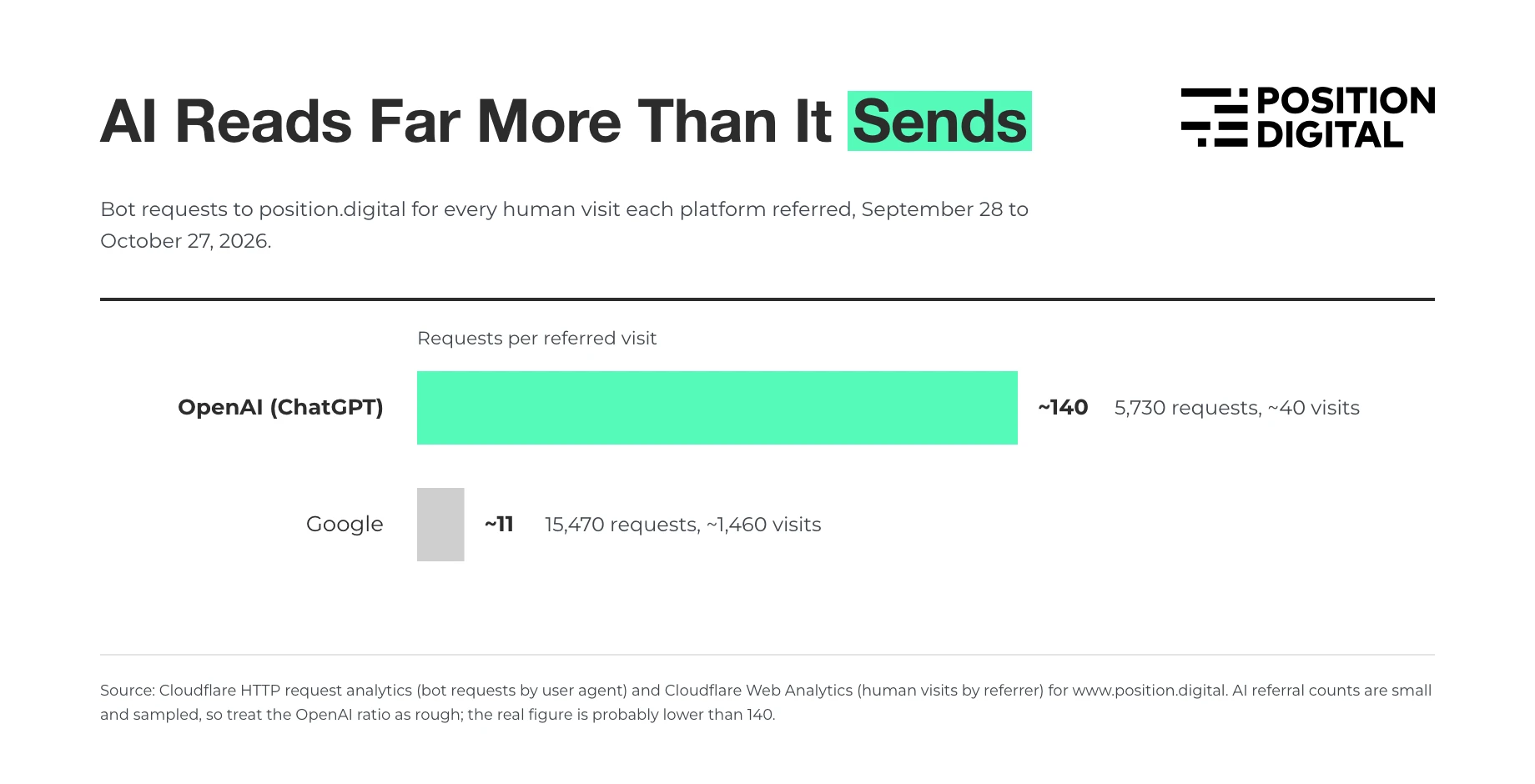
Every one of those ChatGPT fetches was a chance for our content to shape an answer. Most of the people who read those answers never clicked through. If they contact you later, they arrive through a branded search or by typing in your URL, and the AI answer gets no credit.
Many AI visits arrive without a source
When a visit arrives with no referrer, analytics files it as direct traffic, and any AI influence is lost. When we started recording where each lead landed, many of our form leads turned out to have no source at all. Any of them could have started with an AI answer.
A few can still be traced. ChatGPT adds utm_source=chatgpt.com to some links, so a lead that landed on a URL with that tag came from ChatGPT, even when the referrer was lost.
Tracking breaks quietly
When we moved our site to a new platform, our form submission events stopped reaching GA4. The forms worked, and leads kept arriving. GA4 just stopped hearing about them.
If we had calculated our AI search ROI from GA4 that month, every channel would have shown zero conversions. Before you calculate anything, compare your analytics conversions with the leads in your CRM or database for the same period. If the totals don’t roughly match, fix the tracking first.
How to Forecast AI Search ROI Before You Invest
If you haven’t invested in AI search yet, you don’t have AI revenue to measure, but you can still estimate what the work could return. Our calculator’s forecast works in four steps.
Step 1: Find your starting AI traffic
In GA4, go to Reports → Acquisition → Traffic acquisition and look for the AI Assistant row (more on that channel below). Take a typical recent month.
If you don’t have the data, use 4.3% of your organic search traffic. That’s the ratio in Conductor’s 2025 benchmarks: AI referrals made up 1.08% of website traffic and organic search 25% (1.08 ÷ 25 = 4.3%).
Step 2: Project the market’s growth
AI referral traffic is growing whether you invest or not. Similarweb found that referral visits from AI platforms to websites grew 117% year over year between June 2025 and May 2026, to an average of 770.7 million a month. That’s about 2.2× in a year.
The forecast assumes your AI traffic grows at that rate even if you do nothing. We call this the market line. Only growth above the market line counts as the work’s return.
Step 3: Decide how much the work could add
This is the assumption that matters most: how far above the market line the work could take you. If you get 100 AI visits a month today, the market line reaches about 220 by month 12. The calculator runs two cases:
- Conservative: by month 12, your AI traffic is 1.5× the market line (330 visits a month), and the extra visitors convert at your site average.
- Expected: by month 12, your AI traffic is 2× the market line (440 visits a month), and the extra visitors convert at 1.5× your site average.
The 1.5× and 2× are our own assumptions, not measured results, so treat the two cases as a range, not a promise.
Step 4: Run the extra traffic through your funnel
Multiply the extra AI visitors by your lead rate, your close rate, and your average customer value. Compare the extra revenue with 12 months of investment.
For example, take a business with 10,000 organic visitors a month and no AI traffic data. It turns 1.5% of visitors into leads, closes 15% of leads, earns $5,000 per customer, and invests $5,000 a month:
| Conservative | Expected | |
|---|---|---|
| Extra AI visitors over 12 months | 2,449 | 4,899 |
| Extra leads | 37 | 110 |
| Extra customers | 6 | 17 |
| Extra revenue | $27,556 | $82,668 |
| Investment | $60,000 | $60,000 |
| ROI | −54% | 38% |
| Pays back in | Not within 12 months | Month 10 |
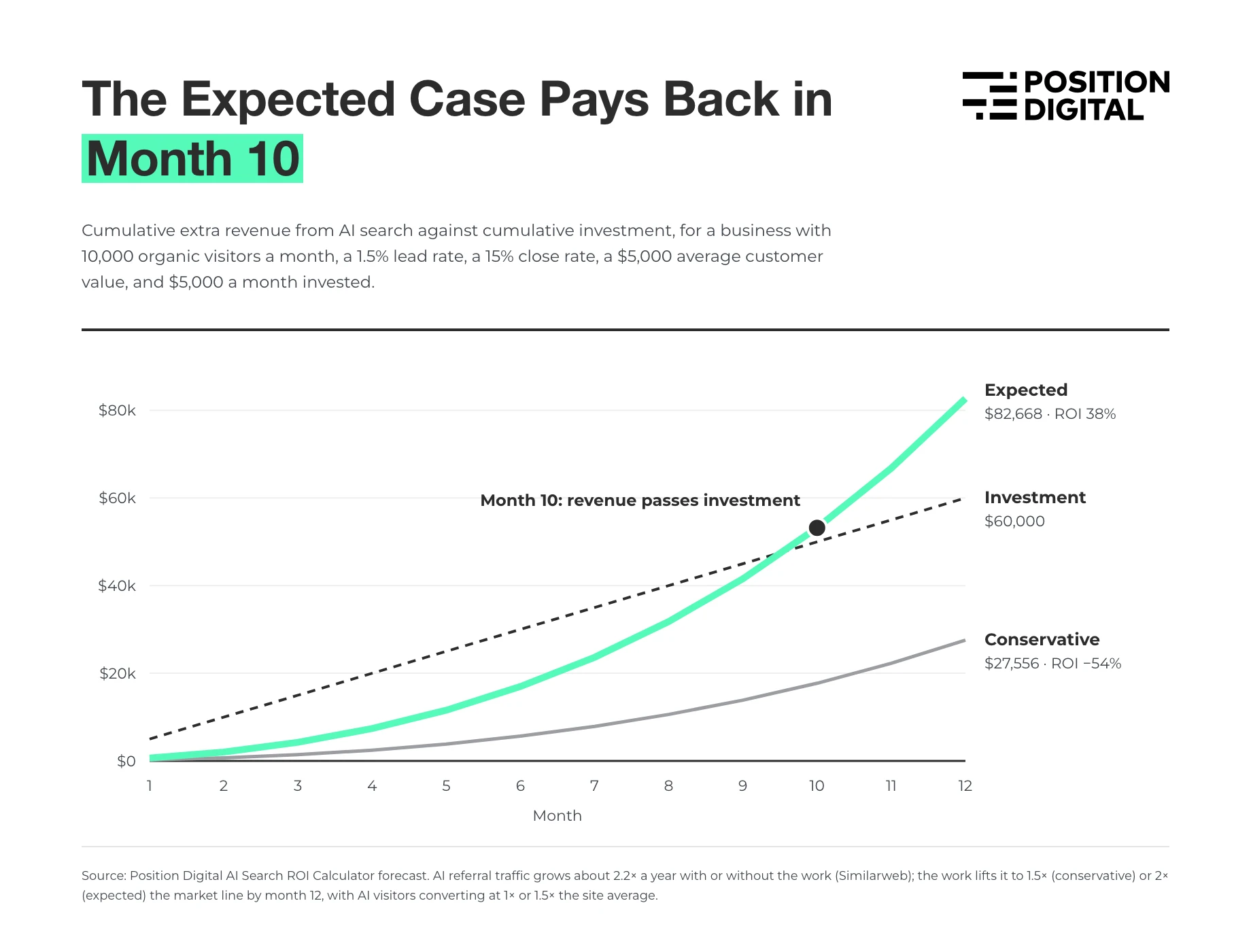
In our example, only the expected case pays back, in month 10. The conservative case doesn’t pay for itself in the first year, because AI visibility builds slowly and most of the extra traffic arrives late in the year. We kept it in on purpose: a forecast that pays back in every scenario is a sales pitch, not a forecast.
Your own results will point to one of three conclusions:
- Both cases pay back within 12 months. The investment holds up even if the work lands at the cautious end. Go ahead, and check your inputs against real data after the first quarter.
- Only the expected case pays back. The investment is reasonable but not certain. Agree a review point with leadership before you start, and use leading indicators to see early which case you’re tracking.
- Neither case pays back. At this budget, the numbers don’t work yet. Try a smaller budget, focus on the pages closest to revenue, or run the forecast again once your AI traffic has grown.
Run the forecast with your own numbers →
How to Measure AI Search ROI Once You’re Investing
Once the work is under way, measure the return with real costs and real revenue. Pick a reporting period first. A quarter works well: a single month is too noisy for most B2B sales cycles. Every cost and revenue figure must cover the same period.
Step 1: Add up your AI-only costs
Some costs exist only because of AI search. Ask yourself: if we stopped AI search work tomorrow, would this cost stop too? If the answer is yes, count all of it:
- AI visibility tracking tools
- An AI search or GEO agency retainer
- Any other AI-only tools or platforms
Step 2: Add the AI share of your shared costs
Other costs cover AI search and other work, so count only the AI share:
- Team salaries: estimate the share of each person’s time spent on AI search work. Ask the team; you don’t need timesheets.
- Freelancers and contractors: count the share of their work aimed at AI visibility.
- Shared tools and SEO suites: use the same share as the team that uses them, unless the tool sells AI features as a separately priced add-on. In that case, count the add-on.
Here’s a typical quarter, using the calculator’s example figures:
| Cost | Quarterly total | Share on AI | Counts as |
|---|---|---|---|
| AI visibility tracking tools | $1,500 | All | $1,500 |
| GEO agency retainer | $6,000 | All | $6,000 |
| Team salaries | $60,000 | 25% | $15,000 |
| Freelancers and contractors | $8,000 | 50% | $4,000 |
| Shared tools and SEO suites | $4,000 | 25% | $1,000 |
| Total AI cost | $27,500 |
Most of the cost is people, not tools. If you leave salaries out, your ROI will look far better than it is.
Step 3: Set up AI referral tracking
Since mid-2026, GA4 has grouped visits from AI assistants into an AI Assistant channel in its default channel grouping. You don’t need to set anything up, but it isn’t complete.
We checked it against our own data, and it missed some AI visits:
- ChatGPT sessions that GA4 filed as Referral
- Sessions recorded with the source “gemini” or “perplexity” rather than the full domain, filed as Unassigned
- Sessions from Meta AI (
l.meta.ai), filed as Referral - Sessions recorded with the source “openai”, and ChatGPT sessions filed as Organic Search
To catch these, and visits from before the channel launched, create a custom channel group. Match the session source against this regular expression, and place the channel above Referral:
chatgpt|openai|claude|gemini|perplexity|copilot|deepseek|grok|meta\.ai|mistralTwo gaps remain that no channel can fix:
- Google’s AI features. Clicks from AI Overviews and AI Mode arrive as ordinary Google organic traffic. Search Console’s Generative AI report shows how often your pages appear there, but not how many clicks they get.
- Visits with no referrer. These stay in direct. Save the referrer and first landing page with every form submission, as we now do, so the source reaches your CRM.
Step 4: Calculate tracked revenue
Take the conversions that came from AI referrals in your period and multiply them by your average customer value. If your CRM passes the source through to closed deals, use the real deal values instead.
If your sales cycle is longer than a quarter, credit each deal to the quarter its lead came in, not the quarter it closed, and update past quarters as deals close. Otherwise your first quarters show costs with no revenue, and later quarters take credit for earlier work.
Count only the conversions that make you money. Our recruitment agency client shows why:
- In September 2026, the agency’s permanent recruitment desk got 1,180 sessions from AI assistants, more than double the 498 it got in September 2025.
- Those visits produced 44 leads, a 2.5% conversion rate, close to the desk’s 2.7% from organic search.
- Every one of the 44 was a job seeker applying for a role. None was a company looking to hire, which is where the agency’s revenue comes from.
- Over the previous three months, AI assistants sent the desk one client enquiry, against 15 client enquiries for the desk as a whole.
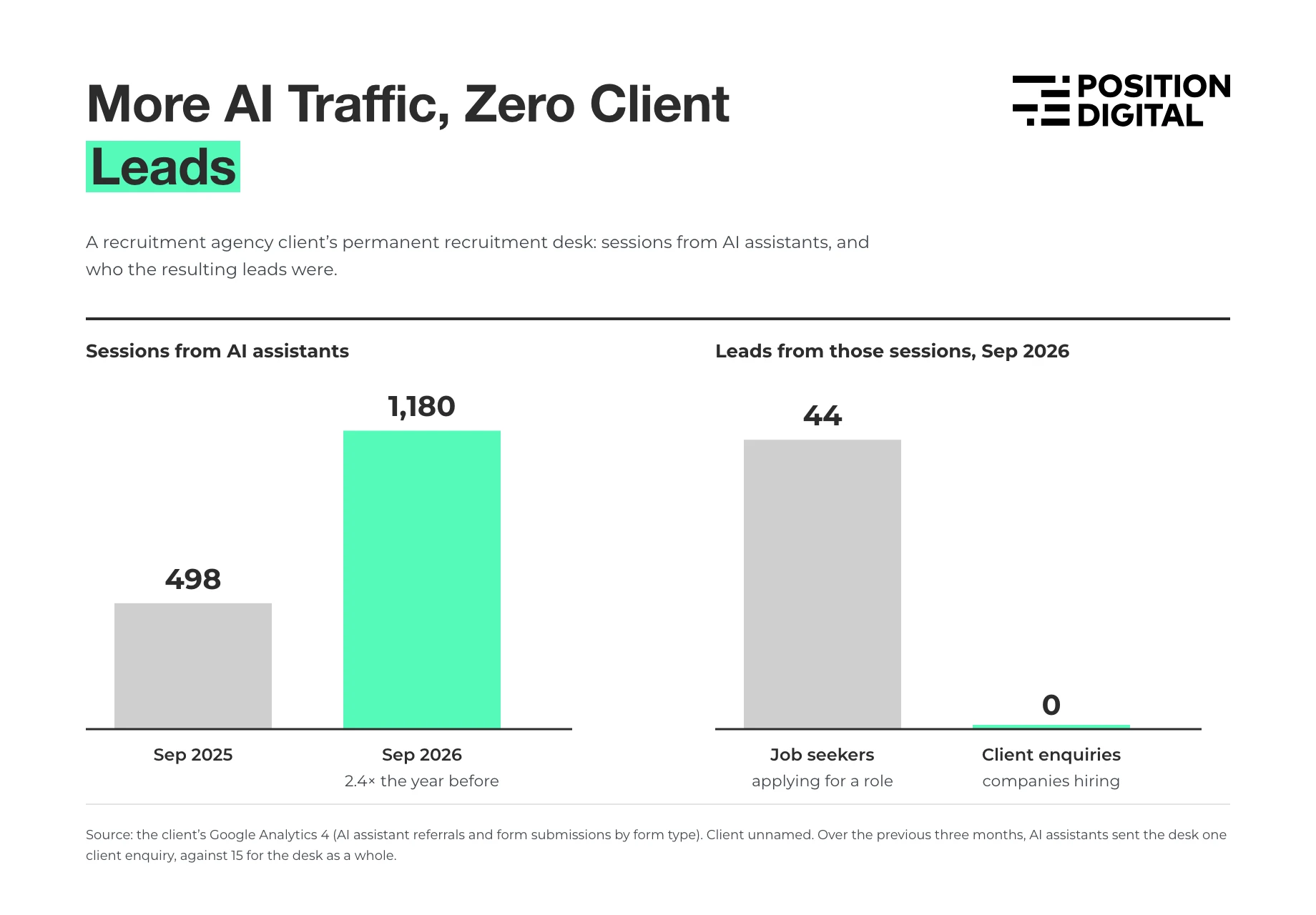
A report that multiplied “AI conversions” by average deal value would have overstated the return many times over. Make sure your conversion events separate revenue-bearing actions (demo requests, client enquiries, purchases) from everything else (job applications, newsletter signups, downloads).
This isn’t a visibility problem. The same client is the most mentioned agency in its category in the AI answers we track. Its visibility just reaches job seekers far more than hiring managers, and measuring ROI properly is what showed us that.
Step 5: Calculate self-reported revenue
Tracked revenue misses everyone who saw you in an AI answer and arrived some other way. To capture them, ask new customers how they found you:
- Add a “How did you hear about us?” question to your signup, demo, or checkout form, with ChatGPT, Gemini, Perplexity, Claude, and Google AI Overviews as separate options. Allow more than one answer.
- At the end of the period, add up the revenue from respondents who chose an AI option, and divide it by the revenue from all respondents. That’s your AI share.
- Multiply the AI share by all your new-customer revenue for the period, including customers who didn’t answer.
If you sell through calls, have your sales team ask the same question on the first call and log the answer in a CRM field. Buyers who researched with AI often say so in conversation even when they skip a form question.
Two things can skew the answers:
- Few responses. If only a handful of customers answer in a quarter, treat the AI share as a rough signal, not a measurement, and say so in your report.
- Buyers who don’t know which part of Google they used. Someone who read an AI Overview may simply pick “Google”. Add an “Other” option with a text box, so you can reclassify answers like “asked ChatGPT” or “Google’s AI answer”.
In the calculator’s example, respondents who chose AI brought in $12,000 of the $100,000 from all respondents, an AI share of 12%. Applied to $400,000 of new-customer revenue, that’s $48,000.
Our own contact form doesn’t ask this question yet, so we rely on referrers alone. It’s the cheapest attribution upgrade most sites can make.
Step 6: Calculate ROI both ways
Run the formula once for each revenue figure. With the $27,500 quarterly cost from Step 2:
| Revenue | ROI | |
|---|---|---|
| Tracked (45 conversions × $1,000) | $45,000 | 64% |
| Self-reported (12% of $400,000) | $48,000 | 75% |
Report both, side by side. Tracked revenue is the floor, because it misses every AI-influenced customer who arrived without a referrer. Self-reported revenue usually comes out higher, because people remember where they first heard of you, not where they last clicked. Recalculate every quarter and watch the trend.
Calculate your current AI search ROI →
Leading Indicators to Track While Revenue Catches Up
Revenue is the last thing to move. These indicators move first, and they show whether the work is on track before it shows up in the ROI:
- Mention rate: the share of your tracked prompts whose AI answers mention your brand.
- Citation rate: the share of answers that link to your site as a source.
- Share of voice: your mentions against your competitors’ across the same prompts.
- AI referral sessions: the AI Assistant channel in GA4, month by month.
- AI impressions in Search Console: since June 2026, Google has been rolling out a Generative AI performance report that shows how often your pages appear in AI Overviews and AI Mode. It counts impressions, not clicks, and isn’t available to every site yet.
- Branded search: clicks and impressions for your brand name in Search Console. Buyers who see you in an AI answer often search for you by name afterwards.
Our guide to monitoring brand visibility in AI search covers how to set up prompt tracking, and our comparison of AI visibility tracking tools covers the software.
What to check, and how often
Each signal moves at a different speed, so check each one on its own schedule:
| Signal | Check it | Why |
|---|---|---|
| Mention rate, citation rate, share of voice | Monthly | These move first. AI answers vary between runs, so track the same prompts each month and judge the three-month trend. |
| AI impressions in Search Console | Monthly | Shows whether Google’s AI features are picking up your pages. |
| AI referral sessions | Monthly | Follows visibility, usually with a lag. |
| Leads from AI, tracked and self-reported | Monthly, judged quarterly | Too few in most months to read on their own. |
| ROI | Quarterly | Long enough for leads to become customers in most B2B sales cycles. |
Expect the gap between the first and last rows to be months, not weeks. The expected case in our forecast example takes 10 months to pay back.
How to Report AI Search ROI to Leadership
Leadership needs to know whether the work is paying off and what happens next, not how attribution works. A one-page quarterly report covers it:
| Section | What goes in it | Type of evidence |
|---|---|---|
| ROI | Tracked ROI as the floor, self-reported ROI alongside, both against last quarter | Measured, self-reported |
| Cost | Total AI cost, split into AI-only and shared | Measured |
| Leading indicators | Mention rate, citation rate, share of voice, AI referral sessions, branded search | Measured, sampled |
| Forecast vs actual | Where you are against the forecast you made before investing | Forecast |
| What we learned | One or two findings, and what they change next quarter | — |
Three rules keep the report credible:
- Label every number with its type of evidence. Measured, self-reported, and forecast numbers carry different weight, and a reader should never have to guess which is which.
- Never add forecast numbers to actual revenue. Show the forecast next to the actuals, so the gap between them is visible.
- Agree the review criteria before the work starts. Decide in advance which results in which quarter mean continue, adjust, or stop. Otherwise every result gets read as success.
The “what we learned” line is often the most useful part. For our recruitment client, it was that AI answers reach job seekers far more than hiring managers, so the next quarter’s work moved toward employer-side prompts and pages.
Mistakes That Skew AI Search ROI
These are the errors we see most often, and some we’ve made ourselves.
- Counting every conversion equally. As our recruitment client showed, AI traffic can convert well and still bring in almost no revenue. Weight conversions by what they’re worth.
- Trusting analytics without checking it. After our site moved platforms, GA4 stopped recording our form submissions while leads kept arriving. Reconcile with your CRM every period.
- Leaving out salaries. People are usually the biggest AI search cost. An ROI that counts only tools and agency fees will look far better than it is.
- Counting your own team’s visits. For two months this year, claude.ai sent us several times more visits than usual. We can’t prove how much of that spike was our own team clicking links in Claude, and that’s the problem. Exclude internal traffic in GA4 before the period starts, because you can’t remove it afterwards.
- Comparing periods that measure different things. When our recruitment client’s second desk went from tracking 7 prompts to 45, its new mention rate couldn’t be compared with the old one. Treat a change like that as a new starting point. The same goes for adding conversion events or AI tools to your tracking.
- Judging too early. In the forecast above, even the expected case takes 10 months to pay back. Set the review period before the work starts, and use leading indicators until then.
Get More From Your AI Search Budget
Measuring ROI tells you whether AI search is paying off. Improving it means getting cited and recommended in the answers your buyers actually see, for the prompts that lead to revenue rather than just traffic.
That’s what we do for B2B and SaaS brands. If you want a higher number in your ROI report, talk to us about AI search optimization, or get in touch and tell us about your goals.
FAQs
What is a good AI search ROI?
There’s no reliable cross-industry benchmark yet, because companies count costs and revenue differently. Any figure above 0% means the work paid for itself on the revenue you can measure. Because tracked revenue undercounts, a small positive ROI on tracked revenue usually means the real return is higher.
The trend matters more than the number. An ROI that rises quarter after quarter, with mention rate and AI referral traffic rising alongside it, is a stronger case than one high quarter.
How long does AI search take to show ROI?
It depends on your starting visibility, your sales cycle, and how much you invest. In our calculator’s example, the expected case pays back in month 10 and the conservative case doesn’t pay back within 12 months. Leading indicators like mention rate and citation rate move first, often within a few months, and revenue follows.
Can Google Analytics track AI search traffic?
Yes. Since mid-2026, GA4 groups visits from AI assistants like ChatGPT, Gemini, Claude, and Perplexity into an AI Assistant channel. On our own site, it caught most, but not all, of the AI-referred sessions we could identify by source. It can’t see visits that arrive without a referrer, and clicks from Google’s AI Overviews and AI Mode count as Google organic traffic.
Does AI search ROI include Google AI Overviews?
It should, but only partly through analytics. Clicks from AI Overviews and AI Mode arrive in GA4 as Google organic traffic, so you can’t separate them there. Search Console’s Generative AI report, rolling out since June 2026, shows how often your pages appear in those features, but counts impressions only, not clicks.
Track those impressions and your AI Overview citations as leading indicators, and include “Google AI Overviews” as an option in your “How did you hear about us?” question so self-reported revenue picks them up.
Should I report tracked or self-reported AI search ROI?
Both, side by side. Tracked ROI comes from your analytics and is the most defensible number, but it’s a floor. Self-reported ROI captures buyers who found you through AI but arrived another way. If the two figures are far apart, that gap is roughly the AI influence your analytics can’t see.
Isn’t AI search ROI just SEO ROI?
Much of the work overlaps. The same content, technical fixes, and digital PR help you rank in Google and get cited in AI answers. That’s why the formula counts only the AI share of shared costs, and only revenue you can connect to AI search through a referrer or the customer’s own answer.
If you also report SEO ROI, check that a customer who says they found you through ChatGPT but arrived from a Google search isn’t counted in both.
When is AI search not worth the investment?
When your buyers don’t use AI assistants to research what you sell, or when the visibility you can win reaches the wrong people. Our recruitment client shows the second risk: strong AI visibility, but with job seekers rather than the companies that pay.
Before you commit, check your AI Assistant traffic and ask “How did you hear about us?” for a quarter. If both are close to zero and the forecast’s expected case doesn’t pay back within the review period you’d agree with leadership, the budget may work harder elsewhere.